


Cardscapes™: Jigsaw Puzzle
4.82.15K Reviews
App Specs
- Version
- 1.15.16
- Updated On
- License
- Free
- Downloads
- 5,000,000+
- Developer
- Malpa Games
- Categories
- Puzzle
- Platform
- Android
Screenshots



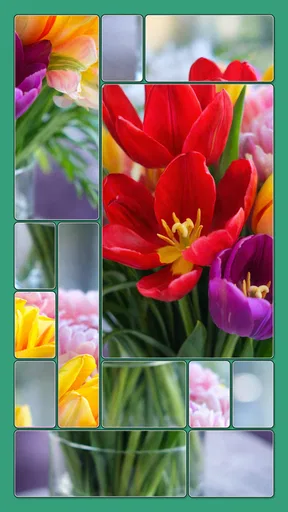



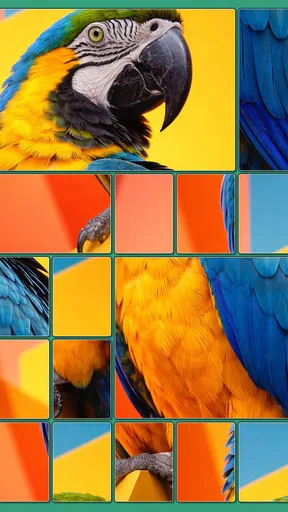
 Analysis by AppCompare
What makes a puzzle comfortable to play is not only its rules, but also how much effort it takes to see what is happening and respond. That is the angle I keep coming back to with Cardscapes: Jigsaw Puzzle: its card-and-picture format is inviting, but the experience still depends on whether its visuals and touch interactions suit you. I would consider it for a quiet break, while keeping in mind that a calm-looking puzzle is not automatically easy for every player to use.
Finding your way around the puzzle
The basic idea is approachable: cards reveal parts of an image, and you work toward completing the picture. That gives the screen a clear purpose, which I find helpful when I want a game I can understand without learning a long list of rules. It is a puzzle game from Malpa Games, and the card element gives its jigsaw format a different rhythm from simply dragging loose pieces around a board.
The store description identifies the game as Cardscapes, while the full title is Cardscapes: Jigsaw Puzzle. It is free to download, rated for Everyone, and has in-app purchases listed at $14.99 per item. Its current version is 1.7.1, and it requires OS 12 or later. The game was released on Dec 11, 2025. Those details make it straightforward to check whether it suits your device and household before installing it; the purchase option is worth remembering if you prefer games with no spending prompts at all.
Its audience figures suggest that many people have given it a try: it has over 1 million installs, about 54,000 ratings, and a 4.8 average. I treat that as useful context rather than proof that it will work equally well for every player. A puzzle can be popular and still feel awkward if its pieces are hard to distinguish on your screen or if repeated touch actions are tiring.
Visual and touch demands
For a player who enjoys looking closely at pictures, revealing an image a little at a time can be part of the appeal. It offers a visual goal beyond moving pieces into place, and I can see it fitting someone who likes a calm activity with a small amount of ongoing problem-solving. The key question is whether the artwork and piece details remain comfortable to inspect on the device you plan to use.
I would try a short session first rather than assuming the game will be comfortable for a long stretch. Puzzle play can involve repeated taps, and any card-based interaction may ask for precision and attention. If small targets, sustained focus, or repeated movements are difficult for you, that is a meaningful consideration—not a personal failing. Taking breaks or using a larger screen, if the game is available on a suitable device you already use, may help, but I would not assume the interface offers specific accessibility settings.
Sound and motion can also affect whether a game feels relaxing. The published article describes soothing music, sound effects, and smooth animations, which may suit players who like a gentle atmosphere. For someone sensitive to audio or movement, those same elements might become distracting. I would check the in-game controls early and see whether the experience can be made comfortable; I would not count on a particular mute, animation, contrast, or text-size option without seeing it in the game.
Worth Reading Before You Choose

EA SPORTS FC Mobile 26 Is a Bigger Football Game, but It Takes Time

Flipboard Shows What News Apps Must Do Beyond the Feed

Switching to Android Auto Means Rethinking Your Driving Routine

Google Calendar Makes a Crowded Week Easier to Manage

Ludo King Makes the Most of the Minutes Between Plans

Baby Panda World Brings Quick Play to Modern Phones, but Its Game Library Feels Busy
When a short session makes sense
This kind of puzzle is most appealing to me in the small gaps of an ordinary day: waiting for an appointment, sitting through a quiet commute, or taking a few minutes away from a busy task. The card-and-image loop gives those moments a concrete focus, unlike scrolling through an endless feed. I would still avoid starting a puzzle when I need to be alert to announcements or conversation, since visual concentration can make it easy to miss what is happening around me.
At home, it could work as a low-pressure activity to share space with someone else, even if you take turns rather than playing together. One person might notice a color or shape that another has overlooked, turning the picture into a casual conversation. That is different from a competitive party game: the appeal here is the shared attention to an image, not fast reactions or loud group play.
For travel, the published article says the game has an offline mode, which could make it useful where a connection is unavailable. I would test that before relying on it for a trip, especially if you expect to need access to every part of the game without internet. A practical habit is to open it while connected, check that the puzzle you want is available, and then see how it behaves offline rather than discovering a limitation mid-journey.
How it differs from familiar puzzle choices
Compared with a traditional jigsaw app, this game puts cards into the route toward completing an image. That may be a welcome variation if you want a little more structure than freely moving pieces, but it may be less appealing if your favorite part of jigsaws is sorting a large spread of pieces and assembling them directly. Likewise, compared with a conventional card game, the picture-building goal changes the focus: it is less about familiar card strategy and more about progressing toward a visual result.
If you want an activity with direct social interaction, a tabletop puzzle with friends may be a better fit. If you want a fast challenge that rewards quick reactions, an action or arcade game is likely to suit you more. I would choose this one when I want a measured pace and a visual task, not when I need deep strategic variety or a screen-free break.
A useful way to judge the fit is to notice what you enjoy during the first few puzzles. If revealing the picture is motivating, the card mechanic is doing its job. If you find yourself wishing you could simply pick up and place every jigsaw piece, the format may feel like an extra step rather than a clever twist. That distinction is more informative than whether you generally like puzzles.
Unveiling the Concept
At its core, Cardscapes: Jigsaw Puzzle is just as the name suggests: a delightful concoction of card games and jigsaw puzzles. The app seamlessly blends these two beloved pastimes, creating a unique experience that's both relaxing and mentally stimulating.
When I first launched the app, I was greeted with a colorful and user-friendly interface. It’s like stepping into a warm, inviting puzzle paradise. The graphics are crisp, and the animations are smooth, making the gameplay visually appealing without being overwhelming. It's one of those small details that truly enhance the overall experience.
Gameplay Mechanics: Easy to Pick Up, Hard to Put Down
Getting started is a breeze. The app provides a brief tutorial that guides you through the basics of the game. You start with a deck of cards, each card revealing a piece of a beautiful puzzle. The objective is simple: complete the puzzle by strategically playing your cards.
One of the things I love about this app is its intuitive design. Even if you’re not a seasoned gamer, you’ll find yourself easily navigating through the levels. The puzzles range in difficulty, keeping things fresh and challenging, yet never frustrating. It's that perfect balance that keeps me coming back for more.
Features that Stand Out
While the gameplay itself is addictive, Cardscapes offers several features that enhance its replay value:
- Diverse Themes: Every puzzle you complete unlocks new themes and backgrounds, adding a delightful visual variety to the game.
- Daily Challenges: These are a real treat! They keep you engaged with new puzzles every day, offering rewards that help you progress even faster.
- Offline Mode: Perfect for when you’re traveling or just want to disconnect from the internet. You can enjoy the game anytime, anywhere.
Each of these features adds a layer of depth to the game, ensuring that there’s always something new to discover.
The Social Aspect
For those who enjoy a bit of friendly competition, Cardscapes doesn’t disappoint. You can connect with friends and compete on leaderboards, showcasing your puzzle-solving prowess. Plus, there’s a lovely community vibe where you can share tips and tricks or simply boast about your latest achievements.
On top of that, the app occasionally hosts themed events that encourage collaboration and competition among players. It’s a fantastic way to engage with the community and add a little extra excitement to the game.
Why You'll Love It
What really sets Cardscapes: Jigsaw Puzzle apart is its ability to create a serene escape while still challenging the mind. Whether you’re a fan of card games, a puzzle enthusiast, or just looking for a new app to pass the time, this game has something for everyone.
The soothing background music and sound effects provide a calming backdrop, making it easy to lose yourself in the game. And with its consistent updates and new content, there's always a reason to come back and play.
All in all, if you're looking for a game that combines strategy, relaxation, and a bit of a mental workout, Cardscapes is definitely worth checking out. Go ahead, give it a try, and see if it becomes your new favorite pastime too!
A few practical checks before settling in
Because the game combines visual inspection with touch input, I would use the first session as a personal comfort test. Try it in the lighting where you normally play, hold the device at a comfortable distance, and notice whether you can distinguish the emerging picture without leaning in or straining. If you are helping someone else decide, let them try the controls themselves instead of judging the interface on their behalf. Comfort varies, and a brief hands-on trial is more useful than a general claim that a puzzle is accessible to everyone.
I would also treat the daily challenges as an optional routine, not an obligation. They can give a player a reason to return, but a daily prompt can feel like pressure if you prefer to play only when you have time. For a relaxed habit, it may be better to open the game when you genuinely want a puzzle and let any challenge fit around that. The same goes for leaderboards and events: they may add motivation for some players, while others will enjoy the picture-solving more if they ignore comparisons.
The listed in-app purchase price is a useful boundary to keep in mind, particularly if a child will be using the game or if you are trying to avoid accidental spending. The game’s Everyone age rating is reassuring for broad audiences, but it does not replace a quick look at purchase controls and device settings in a family setup. I would make that check before handing over a phone, rather than assuming a free download means every part of play is free.
Who is likely to enjoy it—and who may prefer something else
I can recommend giving it a try if you like pictures, modest problem-solving, and a pace that leaves room to think. It may suit a beginner who finds conventional jigsaws too open-ended, since the card structure gives each move a defined role. It can also be a pleasant alternative for experienced puzzle fans who want a lighter format between more demanding games.
I would steer away from it if you want a highly tactile, unconstrained jigsaw experience, if repeated screen interaction is uncomfortable, or if you need strong competition and constant strategic change to stay interested. Someone who has trouble with small visual details may also want to test the game before committing to regular play. Those are not flaws in the player; they are signs that another format could be a better match.
My overall view is that this is a promising choice for short, picture-led puzzle sessions, with the card mechanic giving it an identity beyond a standard digital jigsaw. Its relaxed presentation and clear central goal are attractive, while its touch and visual demands deserve an honest trial. If that interaction feels comfortable and you enjoy gradually uncovering artwork, I can see it becoming a satisfying little break in the day; if not, a larger-piece jigsaw or a less screen-focused pastime may serve you better.
Pros
- Beautifully designed card visuals.
- Challenging puzzles keep you engaged.
- Regular updates with new levels.
- User-friendly interface
- easy to navigate.
- Offline mode available for play anywhere.
Cons
- Some levels can be overly difficult.
- In-app purchases can be pricey.
- Ads can interrupt gameplay.
- Limited free hints available.
- Requires significant storage space.
FAQs for Cardscapes™: Jigsaw Puzzle
What is Cardscapes: Jigsaw Puzzle and how does it work?
Cardscapes: Jigsaw Puzzle is a unique app that combines the challenging elements of jigsaw puzzles with the strategic aspects of card games. Players complete various picturesque scenes by arranging and matching puzzle pieces in the correct order. The app offers different levels of difficulty, catering to both beginners and seasoned puzzle enthusiasts.
Is Cardscapes: Jigsaw Puzzle free to download and play?
Cardscapes: Jigsaw Puzzle is free to download on both Android and iOS platforms. The game includes optional in-app purchases that can enhance gameplay, such as additional puzzle packs or power-ups. However, these purchases are not necessary to enjoy the full experience of the game.
What are the key features that make Cardscapes: Jigsaw Puzzle stand out?
Cardscapes: Jigsaw Puzzle offers a variety of features that make it unique, including a diverse range of puzzle themes, daily challenges, and a leaderboard to compete with friends. The app also provides a relaxing soundtrack and beautiful graphics, creating an immersive puzzle-solving experience. Additionally, the game updates regularly with new content.
Are there any age restrictions for playing Cardscapes: Jigsaw Puzzle?
Cardscapes: Jigsaw Puzzle is suitable for all ages and is designed to be family-friendly. The app promotes cognitive skills and problem-solving abilities, making it an excellent choice for both children and adults. Parents can be assured of its safe and educational content.
What should I do if I encounter technical issues while playing Cardscapes: Jigsaw Puzzle?
If you experience any technical difficulties, the app provides a support feature where you can report problems directly to the developers. Ensure your app is updated to the latest version, and check your device’s compatibility. The developers are responsive and aim to resolve issues promptly to ensure optimal gameplay.


